Letting players choose their own pronouns is a great way to add immersion and a sense of ownership to your stories. Here we'll go through the basics of setting that up in Project Mammut.
Set up the variables
Open the Variables Manager.
Click Add Variable.

Enter the variable name as subjectPronoun, set Type to string, and set Value to She (this will be the default). Save the change.
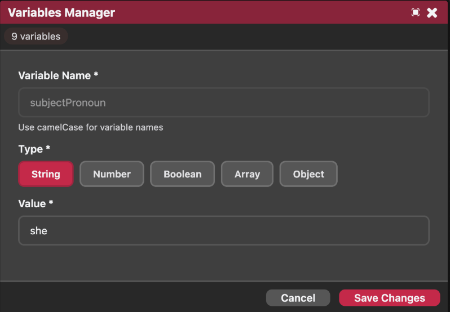
Now add the rest of the variables the same way. You need nine in total:
| Variable | Examples |
|---|---|
subjectPronoun |
he, she, they |
objectPronoun |
him, her, them |
possessiveAdjective |
his, her, their |
possessivePronoun |
his, hers, theirs |
reflexivePronoun |
himself, herself, themselves |
bePresent |
is, is, are |
bePast |
was, was, were |
hasVerb |
has, has, have |
doVerb |
does, does, do |
Write the story
As an example, we'll build a simple node tree of five nodes.
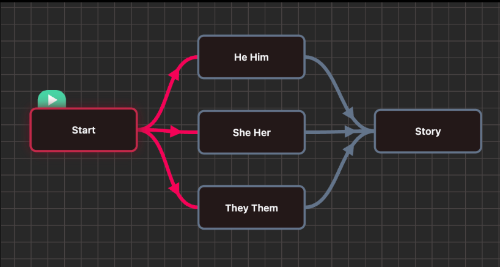
The start node just asks the player which pronouns they'd prefer, as a set of LinkOption choices.
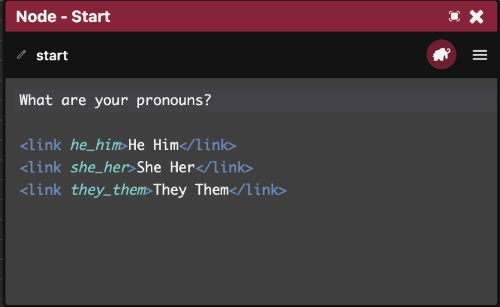
What are your pronouns?

<link he_him> He Him </link>
<link he_him> She Her </link>
<link he_him> They Them </link>
The next three nodes each set the nine variables to the right strings for one pronoun set, using {set(...)}:
He/Him:
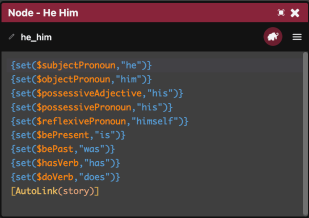
{set($subjectPronoun,"he")}
{set($objectPronoun,"him")}
{set($possessiveAdjective,"his")}
{set($possessivePronoun,"his")}
{set($reflexivePronoun,"himself")}
{set($bePresent,"is")}
{set($bePast,"was")}
{set($hasVerb,"has")}
{set($doVerb,"does")}
[AutoLink(story)]
She/Her:
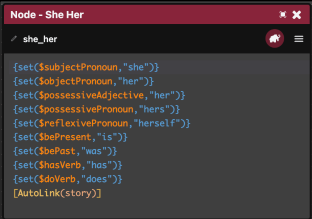
{set($subjectPronoun,"she")}
{set($objectPronoun,"her")}
{set($possessiveAdjective,"her")}
{set($possessivePronoun,"hers")}
{set($reflexivePronoun,"herself")}
{set($bePresent,"is")}
{set($bePast,"was")}
{set($hasVerb,"has")}
{set($doVerb,"does")}
[AutoLink(story)]
They/Them:
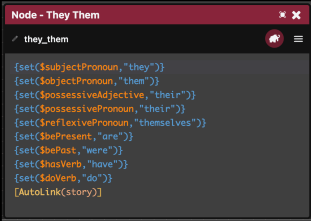
{set($subjectPronoun,"they")}
{set($objectPronoun,"them")}
{set($possessiveAdjective,"their")}
{set($possessivePronoun,"their")}
{set($reflexivePronoun,"themselves")}
{set($bePresent,"are")}
{set($bePast,"were")}
{set($hasVerb,"have")}
{set($doVerb,"do")}
[AutoLink(story)]
The last node shows how you'd actually write with these in a chapter.
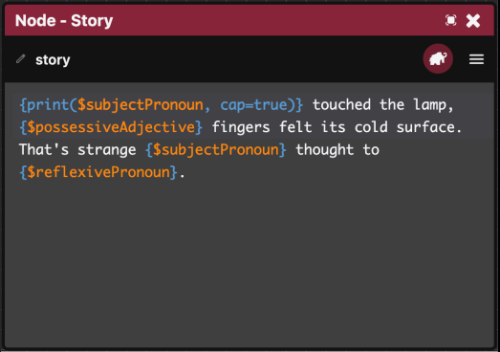
print{$subjectPronoun, cap=true}} touched the lamp,
{$possessiveAdjective} fingers felt its cold surface.
That's strange {$subjectPronoun} thought to {$reflexivePronoun).
Writing {$variableName} prints that variable straight into the paragraph, as covered on Logic.
The one issue is capitalising the first letter of a variable at the start of a sentence. For that, use {print($variableName, cap=true)} instead. {$variableName} is just shorthand for {print($variableName)}; writing out the full print(...) form is what lets you pass extra options like cap=true.
Try it out
Run the story, and the text should now read back using whichever pronouns the player picked. See Play & Preview for how to test it.
